
A warning light on the dashboard tells you something changed inside your car, though it rarely tells you what. The detail behind that light is stored as a fault code, and reading it yourself takes a scanner plugged into the OBD2 port under the dashboard, the ignition switched on, and a scan run from the tool or its phone app, which together take about five minutes.
This guide walks through how to read car fault codes yourself, what those codes mean once you have them, and when a reading points to something worth handing to a professional.
Key takeaways
- Where to read: the OBD2 port under the dashboard, standard on US cars since 1996, EU petrol cars since 2001, and on virtually every car from 2008 on.
- The format: codes follow one pattern, P, B, C, or U plus four digits pointing to the exact fault.
- Reading vs clearing: reading codes is passive and safe, while clearing them only hides the symptom until the cause is fixed.
- Tool limits: basic readers stop at engine codes; ABS, airbag, and brand-specific systems need a licensed tool.
- If the light flashes: the problem is serious and urgent, so reduce load and get the car checked as soon as possible.
What is a car fault code?
A fault code is your car's own description of a problem, recorded by one of its onboard control units. Every car sold in the United States since 1996, and every petrol car sold in the European Union since 2001, carries a standardized on-board diagnostics system known as OBD2 (or EOBD in Europe). When a sensor reads something outside its expected range, the relevant control unit logs a Diagnostic Trouble Code and, in many cases, illuminates a warning light so the driver knows to look closer.
These codes follow a shared five-character format that stays consistent across almost every manufacturer. The first letter marks the system involved: P for powertrain, B for body, C for chassis, and U for network and communication. The digits that follow narrow it down to the exact component or condition, so a single code can point you toward a specific circuit rather than a vague symptom. Codes beginning with P0 are generic across all brands, while P1 codes are manufacturer-specific and often need brand-level tools to interpret fully.
We keep a plain list of OBD codes if you want to look one up.
What do you need to read fault codes at home?
Reading codes starts with the OBD2 port, a trapezoidal 16-pin connector that sits within reach of the driver's seat on nearly every modern car. On most vehicles it lives under the dashboard near the steering column, sometimes behind a small cover, and our guide on how to locate the OBD2 port lists the other spots manufacturers use. Because the port and its data format are standardized, one tool can read basic engine and emissions codes across a wide range of makes and models.
The tool itself comes in two broad forms. Standalone code readers are handheld units with a small screen that plug straight into the port and display codes directly. App-based tools have made the process cheaper and more approachable, pairing a compact Bluetooth device with a smartphone app that reads the codes, explains them in plain language, and stores a history you can revisit.
Our pocket-sized OBDeleven device works this way, connecting to the OBD2 port and reading engine faults on most cars built from 2008 onward that use the CAN-bus protocol. On Volkswagen Group, BMW Group, Toyota Group, Mercedes-Benz and US-manufactured Ford vehicles, OBDeleven is officially licensed by the manufacturers themselves, which adds deeper diagnostics and customization beyond the basic emissions codes that generic readers cover.
Which fault-code tool reads what?
Matching the tool to the job is where most buying decisions actually get made, because not every tool reads every system. Basic readers handle the engine and emissions codes behind the majority of check engine lights, while deeper systems such as ABS, airbags, and brand-specific functions call for a more capable, licensed tool. The table below shows where each type lands.
| Capability | App with licensed device (OBDeleven 3) | Basic handheld reader (ELM327) | App with generic Bluetooth device |
|---|---|---|---|
| Engine & emissions codes | ✓ Yes | ✓ Yes | ✓ Yes |
| ABS, airbag & body codes | ✓ Yes, on supported brands | ✗ No | ✗ Mostly no |
| Manufacturer-specific codes | ✓ Yes | ✗ Limited | ✗ Limited |
| Live data | ✓ Yes | Basic | ✓ Yes, with charts |
| Coding & customization | ✓ Yes, on paid plans | ✗ No | ✗ No |
| Plain-language explanations | ✓ Yes | ✗ Rarely | ✓ Yes |
For an occasional engine-code check, a basic reader does the job. For everything past the engine codes, the licensed-device column of the table shows what an app-based tool adds.
How to read your car's fault codes step by step
The scan itself is short once you have a tool and the port located. Working through it in order keeps the reading clean and repeatable.
- Find the OBD2 port. Look under the dashboard on the driver's side, near or below the steering column. Check behind any small trim panel if it is not immediately visible.
- Connect your scanner or device. Plug a handheld reader straight in, or insert the Bluetooth device and pair it with the app on your phone.
- Switch the ignition on. Turn the key to the "on" position, or in a push-button car press the start button without touching the brake, so the dashboard lights up but the engine stays off. That powers the control units so they can talk to the scanner. Some tools ask you to start the engine for live data, so follow the on-screen prompt.
- Run the scan. Select the read or scan option. The tool queries the control units and returns any stored codes, usually within a few seconds.
- Record what you find. Note each code and its description before you clear anything, so you keep a reference if the fault returns or if you later speak to a mechanic.
What does a fault scan look like in the OBDeleven app?
Seeing the flow once removes most of the intimidation. The screens below show a scan with the OBDeleven device and app on a Volkswagen Golf GTE: after the device pairs, one tap scans every control unit the car exposes, and the home screen sums up the result, with badges on the system icons showing where the problems sit and a headline count that opens the full list.
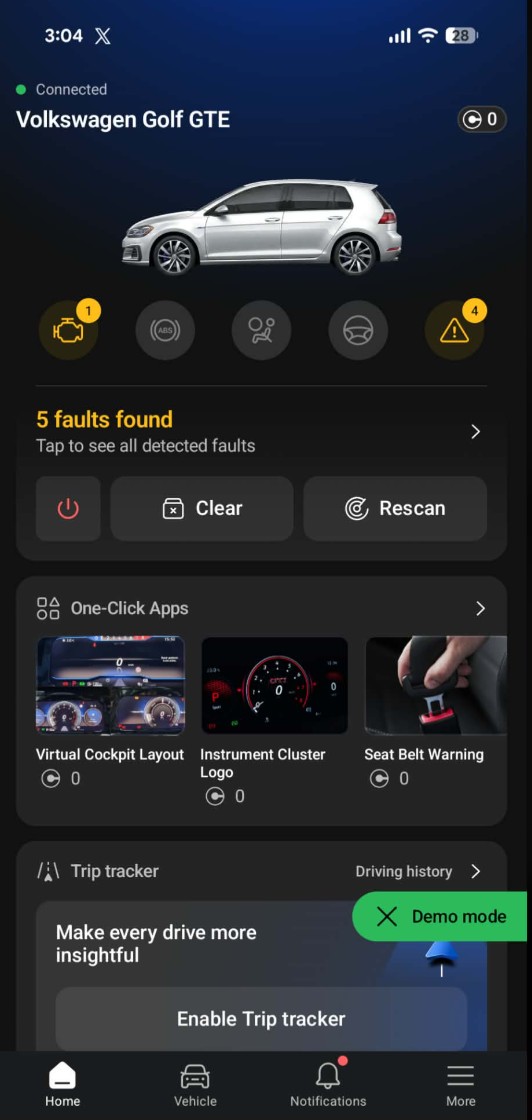
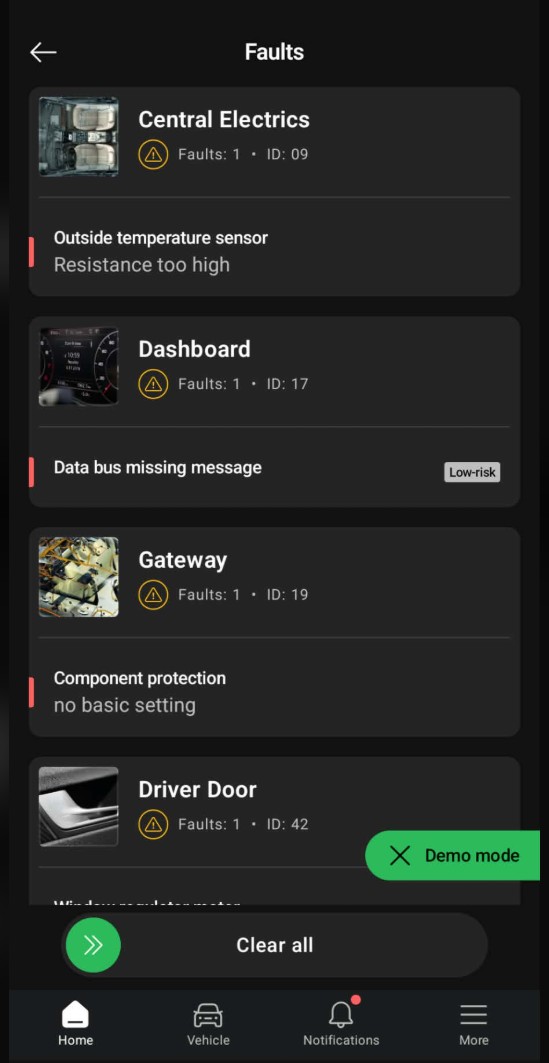
The fault list is organized by control unit, named and numbered the way the car reports them (Central Electrics, ID 09; Dashboard, ID 17). Each fault comes described in plain language, so "Outside temperature sensor, resistance too high" replaces a five-character code.
Faults also carry severity labels (High-risk for immediate attention, Medium-risk for soon, Low-risk for a planned visit), and this triage is the practical difference between a code list and a decision, because the label answers the question every driver actually has, which is "do I need to deal with this today?"
Opening a specific fault goes one level deeper, into its AI fault explanation: what the code means in plain language and how serious it is, with a built-in Google shortcut that takes the exact code straight to search when you want to dig into causes and owner experiences yourself. A generic reader hands you a five-character string and leaves the rest to you; this explanation layer is what turns the string into a starting plan.
What does a code mean once you have it?
Reading the code is only useful once you can translate it into a real fault, and the same three codes come up so often that they make the best examples.
Our guide to the most common car fault codes covers these and many more.
Good tools handle much of this translation for you and attach a plain description to each code, which turns a string of characters into a starting point for a repair. Treat the code as a direction rather than a final diagnosis, since one underlying fault can trigger several codes and one code can have several causes. The value of reading it yourself is that you walk into any repair conversation already knowing what the car reported.
Can you clear fault codes yourself?
Most scanners and apps can clear stored codes, and doing so switches off the associated warning light. This is genuinely useful after you have fixed the underlying problem, since it confirms whether the repair held or whether the fault returns on the next drive cycle.
Clearing a code without fixing the cause only hides the symptom, and the light will usually come back once the car detects the same condition again. Clearing also resets the readiness monitors the car uses to confirm its emissions systems are working, and those monitors can take several drive cycles to complete, which matters if you have an emissions or roadworthiness test coming up.
A flashing engine light deserves particular caution, because it means a serious problem is active right now, so the right response is to reduce load and get the car looked at rather than simply clearing the code.
When should a mechanic take over?
Some readings call for professional help regardless of how confident you feel with the tool. A flashing check engine light, codes tied to braking, airbag, or stability systems, and any fault that keeps returning after you clear it all point toward a garage rather than a driveway fix. The same is true when the car shows a clear drivability problem such as stalling, heavy misfiring, or a loss of power alongside the code.
Drive with care and address the fault soon. Read the code first, so you know what you are dealing with before anyone quotes a repair.
A serious, urgent problem that needs immediate attention. Reduce load and get the car checked as soon as possible.
Reading the codes first still pays off in these cases, because you arrive with specific information instead of a vague complaint. That shortens the diagnostic time a workshop needs and makes it easier to judge whether a quoted repair matches what the car actually reported.
Which tool should you choose?
Your choice comes down to how far you want to go past a single reading. For the occasional engine light, an inexpensive handheld reader is enough to pull the code and clear it.
A licensed app-based tool like OBDeleven earns its place when you want more from the same scan. It explains each fault in plain language, labels how urgent it is, and shows live data while the engine runs. It also reaches the deeper systems, ABS, airbag and brand-specific functions, and adds one-tap customization through One-Click Apps, all from one small device.
OBDeleven's basic OBD2 diagnostics covers engine faults on every car brand built from 2008 onward, and the supported vehicles list shows how deep it reads on your exact car. Every device comes with the Free plan, unlimited diagnostics included, so the first scan costs nothing beyond the device itself. If you are weighing a licensed tool against a multi-brand scanner, our OBDeleven vs ThinkDiag comparison runs the three-year numbers side by side.
Read your first fault code today
Get OBDeleven 3
The takeaway
Learning to read car fault codes puts the same first step a mechanic takes within reach of any driver with a standardized port and an affordable tool. You move from wondering what a warning light means to knowing exactly what the car reported, which helps you judge urgency, avoid unnecessary trips, and hold a clearer conversation when a repair genuinely needs a professional. We built OBDeleven to make that first reading quick, and the habit of checking before reacting tends to save both money and stress over the life of a car.
Frequently asked questions
Does reading fault codes damage my car?
No. Reading codes is a passive query that asks the control units what they have stored, and it makes no changes to the vehicle. Clearing codes is a separate action you choose deliberately.
Will an OBD2 scanner turn off my check engine light?
Yes, most scanners can clear the code and switch the light off, though the light returns if the underlying fault is still present. Fix the cause first, then clear the code to confirm the repair worked.
Can a basic scanner read ABS or airbag codes?
Often not. Generic OBD2 readers focus on engine and emissions codes, while ABS, airbag, and other body or chassis systems usually need a more advanced or brand-licensed tool to read reliably.
Is it safe to keep driving with the check engine light on?
A steady light generally means you can drive with care and address the fault soon. A flashing light indicates a more serious problem, so reduce load and arrange a check as quickly as possible.
What does the letter at the start of a code mean?
It identifies the system: P for powertrain, B for body, C for chassis, and U for network and communication. The digits that follow pinpoint the specific fault within that system.